Install QEMU on Ubuntu 22.04
The QEMU official
website has provided tutorial on how to install it. According to the
website, we just need to execute sudo apt-get install qemu
on Ubuntu to install QEMU. However, I got an error and failed to fix it.
So I decided to install QEMU from the source code. This blog will take
QEMU 7.2.0 version as an example to introduce the installation
process.
Download the source code and unzip it
1
2
3
$ wget https://download.qemu.org/qemu-7.2.0.tar.xz
$ tar xvJf qemu-7.2.0.tar.xz
$ cd qemu-7.2.0Preprocessing before compilation
1
$ ./configureHandle error
After executing the command above, an error like this may be reported:

The reason for the error is that the system lacks the dependencies required by QEMU. Run the following command to install dependencies:
1
2
3
4
$ sudo apt-get install ninja-build
$ sudo apt-get install zlib1g zlib1g-dev
$ sudo apt-get install libglib2.0-dev
$ sudo apt-get install libpixman-1-devrun the command again:
1
$ ./configureUse make to compile the source code
1
$ makeAfter typing the command above, the compilation process begins and will last for some time. Please wait patiently.
Install
1
$ sudo make installVerify that the installation is successful
1
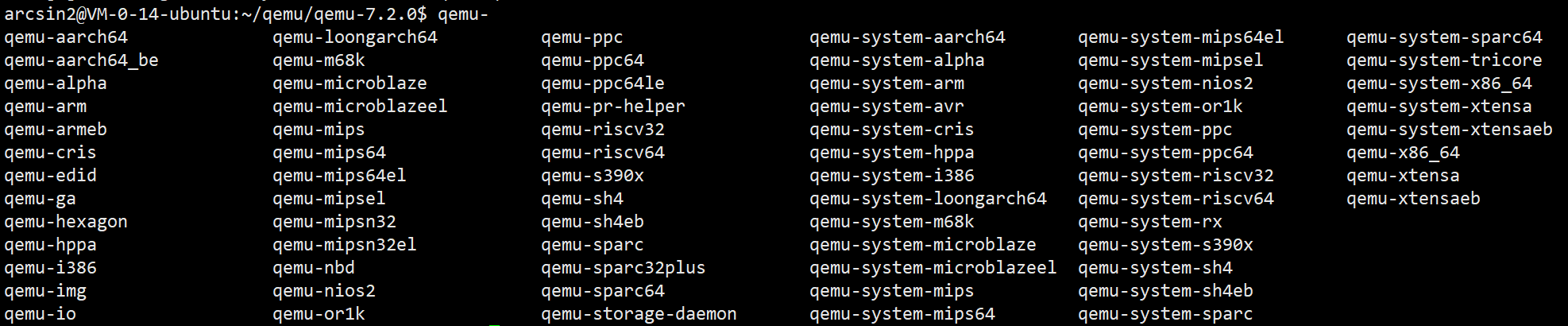
$ qemu-Enter
qemu-and press TAB twice. If the output similar to the following appears, the installation is successful.